Looking for an AI presentation generator for business that still lets your team edit slides like real PowerPoint? This guide breaks down common business use cases, what to look for in an AI deck tool, and a workflow that keeps presentations editable from first draft to final export.
What Business Teams Actually Need From an AI Presentation Tool
Editable slides (not PNG-only screenshots)
Consistent structure and readable layouts
Fast updates when priorities change
Exports that fit existing PowerPoint workflows
High-quality visuals for storytelling (without clutter)
For business teams, the "AI" part is only valuable if it reduces the edit loop. Your deck will change. Stakeholders will ask for a different headline. Numbers will update. Brand will matter. A good AI presentation generator for business should handle iteration, not just first drafts.
Use Cases: Where AI Presentations Help Business Teams
Common business decks and what to generate
Team
Deck type
What Presentia.ai helps generate
Sales
Account pitch / proposal
Clear narrative structure, product value slides, case study layout
KPIs, risks, priorities, next steps with clean readability
Founders
Investor deck
Problem/solution, traction, market, roadmap, with strong visuals
Operations
Process doc
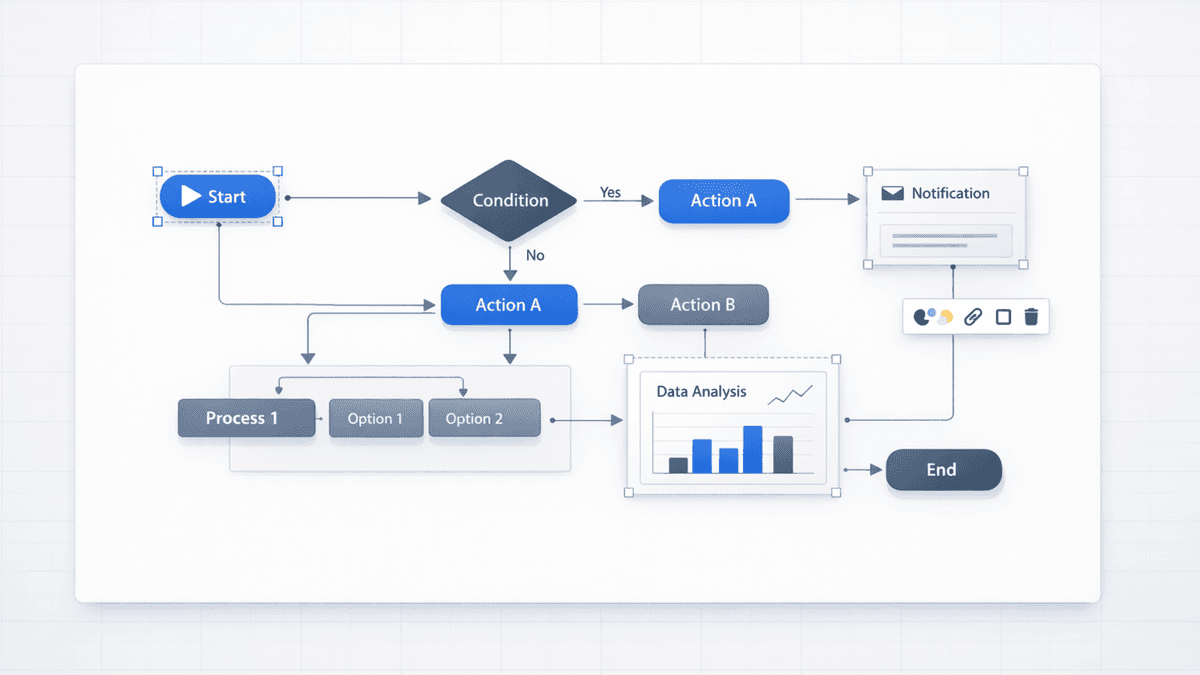
Step-by-step flows and diagrams using editable shapes and labels
Business Deck Structures That Usually Work
If you want your AI presentation generator for business to produce something you can actually use, give it a familiar structure. These patterns work across industries and keep edits predictable.
Reusable slide outlines
Deck type
Suggested outline (high level)
Sales pitch
Problem → Why now → Solution → Proof → How it works → Pricing/CTA
For sales, the goal is not to generate 30 slides. The goal is to generate a clear narrative fast, then customize the parts that matter: customer pain, proof, and next steps.
Keep slides scannable: one headline + 3 bullets.
Use one diagram slide to explain how it works (process flow or before/after).
Leave placeholders for pricing, ROI, and metrics so updates are painless.
Leadership updates: KPI-first and readable
Leadership decks succeed when they are readable and repeatable. Ask for KPI placeholders, a risks slide, and a simple plan slide. Then edit in Edit mode when numbers change.
Investor decks: structure beats style
Investor decks are judged on narrative clarity. Use Presentia to generate a clean structure (problem → solution → traction → market → roadmap), then iterate quickly in Edit mode based on feedback.
A realistic workflow for business is not "generate and pray". It is: generate, edit, review, then export.
Start with your outline or upload a doc (PDF/DOCX/TXT).
Choose a template and theme (or use Auto theme selection).
Generate slides. Preview mode shows Nano Banana Pro renders for fast review.
Switch to Edit mode to adjust text boxes, shapes, and images.
Export PPTX or PDF for sharing and presenting.
Prompts That Work Well for Business (Copy/Paste)
Sales deck prompt
Create a 10-slide sales deck.

Product: [YOUR PRODUCT]
Audience: [ICP + role]
Goal: book a follow-up call
Tone: confident, minimal, high-contrast

Must include:
- Problem slide with 3 bullets
- Solution slide with 3 proof points
- 3-slide narrative: before vs after vs how it works
- Pricing slide with placeholders
- Case study slide (template)
- Closing slide with next steps

Constraints:
- No tiny text
- Clear section headers
- Use diagrams as shapes + labels (editable)
Leadership update prompt
Create an 8-slide leadership update deck for [WEEK / MONTH].

Audience: exec team
Tone: crisp, neutral, minimal

Must include:
- KPI summary (placeholders)
- Wins / learnings
- Risks / mitigations
- Top 3 priorities next period
- 3-step operating plan diagram

Constraints:
- Prioritize readability over decoration
- High-contrast containers for text
- Keep diagrams editable
Investor deck prompt
Create a 12-slide investor deck.

Company: [NAME]
Audience: seed investors
Tone: crisp, minimal, high-contrast

Must include:
- Problem (who, pain, severity)
- Solution (why now)
- Product (how it works)
- Market (TAM/SAM/SOM placeholders)
- Traction (placeholders)
- Business model
- Go-to-market
- Competition
- Roadmap
- Team
- Ask (use of funds + milestones)

Constraints:
- Avoid tiny text
- Keep charts simple
- Use diagrams as editable shapes + labels
How to Run the Stakeholder Review Loop (Fast)
Share the exported PPTX/PDF for feedback (it matches Preview mode).
Collect comments in one place (Slack thread, doc, or email) and batch changes.
Apply edits in Presentia (Edit mode) and regenerate only the slides you touched.
Export again and resend the final version.
A prompt that includes audience, constraints, and slide requirements produces better decks.
Nano Banana Pro Visuals for Business Storytelling
Nano Banana Pro helps keep slides readable while still looking premium. The goal is not decoration. The goal is clarity: strong hierarchy, high contrast, and visuals that support the message.
Use it for cover slides, section dividers, and high-level concept slides.
Keep KPI slides clean and editable so numbers can change safely.